Understanding kafka-consumer-groups.sh
Apache Kafka, widely known for its distributed event streaming platform, provides robust support for message-based applications. One important component of Kafka is consumer groups, which allow multiple consumers to work together to process data.To manage these groups, Kafka provides a useful tool called kafka-consumer-groups.sh. This tool helps you monitor, control, and adjust how consumers in a group are working.
In this article, we’ll explore about Kafka Topics,partitions,what Kafka-consumer-groups.sh does, how to use it, and break down its essential features.
Kafka Topics
In general, a topic refers to a specific heading or label assigned to a set of related ideas. In Kafka, the term "topic" denotes a category or a shared name used to store and distribute a particular data stream. Essentially, topics in Kafka function similarly to database tables but without the associated constraints. Kafka allows for the creation of any number of topics, each uniquely identified by a name chosen by the user. As shown in figure 1 producer sends data to these topics, while a consumer group retrieves the data by subscribing to the topics. In Kafka, a consumer group is a collection of consumers that work together to read data from topics. The group ensures no data duplication or omission by having each consumer process a distinct portion of the data. consumer groups allow Kafka to scale horizontally by distributing the workload across multiple consumers.
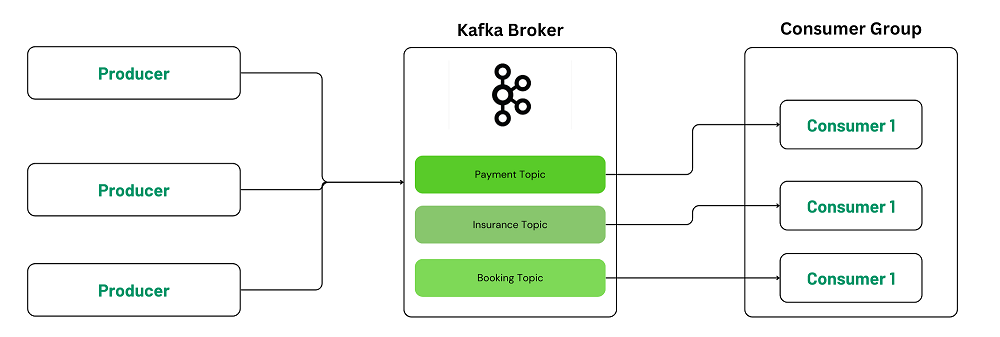
In nutshell, Topics in Kafka define the category or type of messages being sent. Consumers (or listeners) subscribe to a specific topic and only receive and respond to messages from that particular topic, filtering out irrelevant data from other topics.
partition in kafka
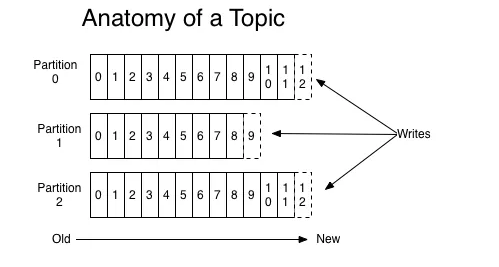
A partition is a fundamental concept in Apache Kafka that distributes data within a topic. A Kafka topic can have one or more partitions, and each partition is essentially a log where messages (or events) are stored sequentially in the order they arrive. Partitions allow Kafka to handle large volumes of data by distributing the load across multiple brokers, enabling parallelism and scalability.
As an example, a producer producing messages to a Kafka topic with 3 partitions would look like this:
What is kafka-consumer-groups.sh
kafka-consumer-groups.sh is a command-line tool that helps you manage consumer groups in Kafka. A consumer group is a group of consumers that work together to read messages from Kafka. Each consumer in the group processes different parts of the data, so the work is shared.
This tool lets you:
- See all consumer groups.
- Check the status of a group (how much work it has done, how much is left, etc.).
- Reset (or change) where a group is in the process of reading data.
- Delete a group if it's no longer needed.
What Can You Do with kafka-consumer-groups.sh?
1. List All Consumer Groups
To see a list of all consumer groups in your Kafka system, use this command:
bin/kafka-consumer-groups.sh --bootstrap-server localhost:9092 --listOutput

This will show all the active consumer groups so you can get an overview of how your system is set up.
2. Check the Details of a Consumer Group
we can check detailed information about a specific consumer group, such as how much work it has done and what it still needs to process (lag), by running:
bin/kafka-consumer-groups.sh --bootstrap-server localhost:9092 --describe --group group1Output

- Current Offset: The last message the consumer processed.
- Log End Offset: The latest message available in the topic.
- Lag: How many messages the consumer still needs to process.
- Consumer ID: Information about the consumer working on this partition.
3. Monitor Consumer Group Lag
One of the most important uses of this tool is checking lag—the number of messages left to be processed by a consumer. A high lag could mean that the consumer is falling behind, which might require more resources (like adding more consumers) to catch up.
4. Resetting Consumer Group Offsets
In some cases, we may need to change where a consumer group starts reading data. This can happen after an error or when you need to reprocess old data. The tool allows you to reset offsets (the position where consumers start reading):
Reset to the Earliest Message:
bin/kafka-consumer-groups.sh --bootstrap-server localhost:9092 --group group1 --reset-offsets --to-earliest --execute --topic java_demoOutput:

Reset to the Latest Message:
bin/kafka-consumer-groups.sh --bootstrap-server localhost:9092 --group group1 --reset-offsets --to-latest --execute --topic java_demoOutput:

Reset to a Specific Offset:
bin/kafka-consumer-groups.sh --bootstrap-server localhost:9092 --group group1 --reset-offsets --to-offset 34 --execute --topic java_demoOutput:

This feature helps us recover or replay messages when necessary.
5. Delete a Consumer Group
If a consumer group is no longer needed, you can delete it using this command:
bin/kafka-consumer-groups.sh --bootstrap-server localhost:9092 --delete --group group1Be careful with this, as deleting a group will erase its progress and history.
Options
--bootstrap-server <broker_host>:<port>: The address of your Kafka broker (required for all commands).
--group <group_name>: The name of the consumer group you want to manage.
--describe: Show detailed information about a consumer group.
--list: List all consumer groups in your Kafka cluster.
--delete: Remove a consumer group.
--reset-offsets: Reset the reading position (offset) for a consumer group.
Conclusion
kafka-consumer-groups.sh is an essential tool for managing, monitoring, and maintaining consumer groups in a Kafka environment. Whether you’re tracking consumer progress through lag monitoring, resetting offsets for recovery, or simply getting a list of active consumer groups, this tool is vital for managing Kafka’s complex messaging systems.
Understanding how to use this command-line utility effectively will enable you to optimize your Kafka consumers, troubleshoot issues, and ensure the reliability of your message-driven applications. With the commands and options discussed in this guide, you can manage Kafka consumer groups with confidence and ensure that your system remains performant and resilient.


